No tool can tell you who opened a one-time link. A link carries no identity, and none of the services below ask the recipient to sign in. What a service can record is that the link was opened, when, and sometimes a hashed network address, a rough location and the browser that did it. The differences between tools are in how much of that they keep, who gets to see it, and whether you are told at the time.
This post lists what each tool records, from its own documentation as of 14 October 2026, so you can choose the right one for the question you actually have: "did they get it?", "when?", or "who else did?". If you only need the link itself, the free one-time secret link generator makes one without an account.
What can a link open prove?
That the link was opened at a certain time, from a certain kind of client, from roughly somewhere, and never who. When someone opens a one-time link, the server sees a request: a time, a network address, a browser string and, from the edge provider, a country and city guess. It does not see a name, an email address or a device owner. Even a tool that stores the raw address only tells you which network the request came from, which for mobile and office traffic is often a shared gateway.
So the honest ceiling for any of these products is: the secret was opened at this time, from this kind of client, from roughly here. That is enough to answer "did my colleague receive the password before I rotate it?" and "was this opened before I even sent it?". It is not enough to accuse anyone.
What each tool records
| Tool | Can you see it was opened? | What is recorded | Who sees it |
|---|---|---|---|
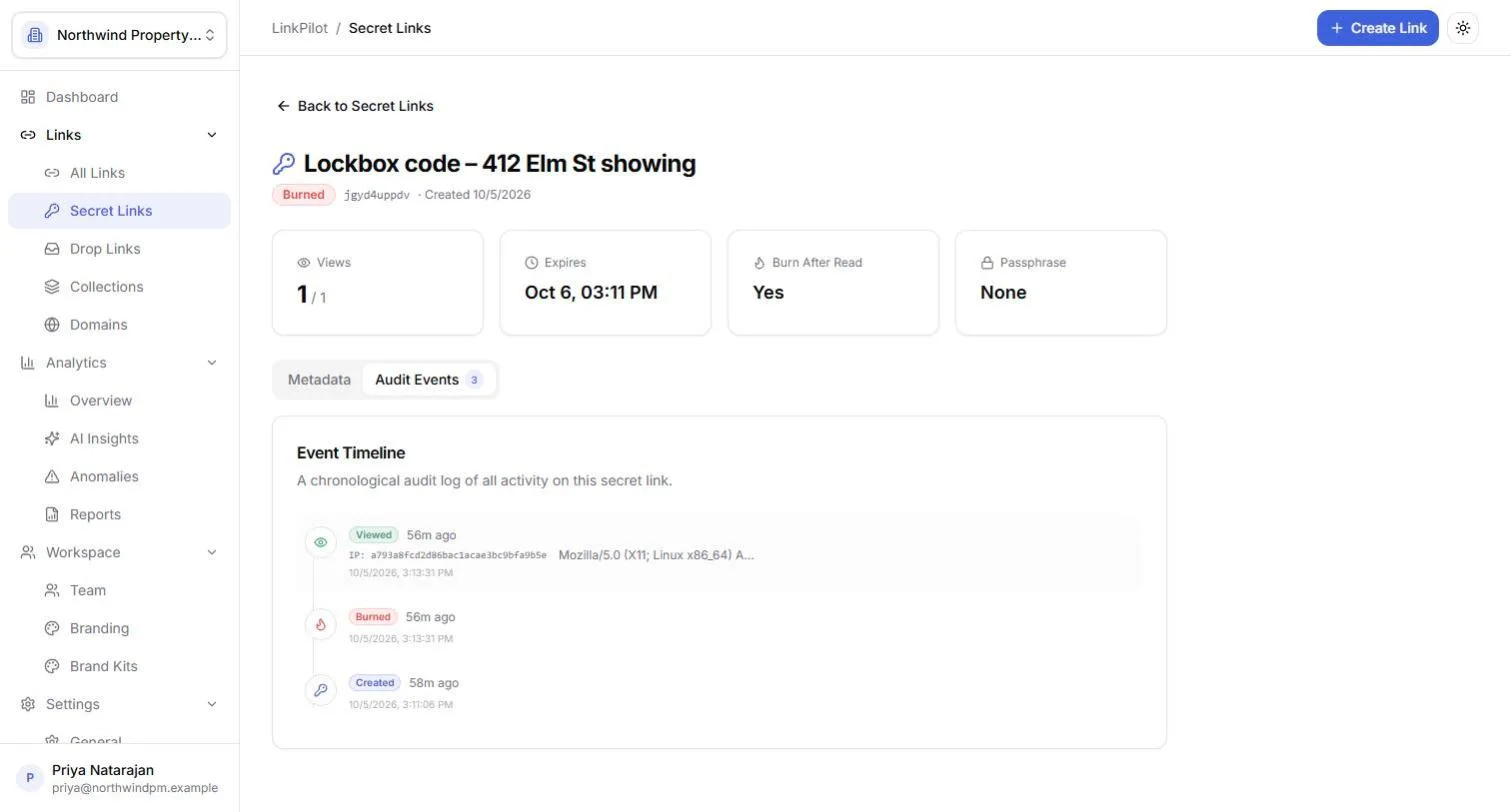
| LinkPilot | Yes, on the secret's timeline | Event type (created, viewed, failed passphrase, burned, expired, revoked), timestamp, hashed IP with a daily salt, country and city from the edge when available, User-Agent string | The workspace, on Pro |
| Password Pusher | Yes, Pro audit log | Timestamps of each view ("viewed by recipient Jun 9, 15:07" in its example) | The sender, on Pro plans |
| Bitwarden Send | View count only | A running count of accesses against the limit you set | The sender |
| Yopass | Business licence: read receipts | A notification by email or webhook when the secret is opened | The sender |
| password.link | Yes, notifications | Events when the link is created, viewed or expires, sent by email, Slack or webhook | The sender |
| SnapPwd | Optional email | A notification when the secret is accessed, if you gave an address | The sender |
| OneTimeSecret | Secret state | Whether the secret has been received or burned; no viewer details in the documentation | The sender |
| PrivateBin, 1time.io, OncePad | No | Nothing about the reader, by design; PrivateBin notes a server admin's access logs could be demanded by authorities | Nobody |
Details are from each vendor's site on the date above and change over time; check the project before relying on a column.
Why LinkPilot keeps a timeline, and why it hashes the address
LinkPilot is built for people sharing credentials on behalf of a business, where "did they open it?" is a compliance question as much as a curiosity. Every secret has a timeline of events: created, viewed, failed passphrase attempt, burned, expired and revoked. Each event carries a timestamp, the country and city the edge reports, the browser's User-Agent string, and a hash of the network address rather than the address itself. The hash uses SHA-256 with a salt that rotates daily and is truncated to 32 characters, so two opens on the same day from the same address match each other, but nobody can turn the record back into an IP, and tomorrow's records cannot be joined to today's.
That trade is deliberate. A workspace owner gets enough to see that a secret was opened twice, from two countries, ten minutes apart, which is the pattern that means "rotate now". They do not get a surveillance record of recipients. Failed passphrase attempts are logged the same way, so a brute-force attempt shows up on the timeline too. The security architecture page lists exactly what is and is not stored.
The timeline is a Pro feature. On the free plan and the anonymous burn-after-read tool the secret still burns on the first reveal and a second visitor sees "already viewed and destroyed", which answers the most common question on its own: if you see that message, it was opened.
What is the record good for?
Confirming delivery, catching an early open, spotting a forward, and writing up an incident.
- Confirming delivery before you rotate. You sent a database password on Friday; on Monday the timeline shows it was opened on Friday from the recipient's city. You can rotate on schedule rather than guessing.
- Catching an early open. The secret was created at 09:00 and opened at 09:00:04 from a data-centre address with a bot-like browser string, before the recipient could possibly have clicked. That is a link preview or a scanner, and it is why LinkPilot answers previews with metadata only and never counts them as a view. See link scanners and one-time secrets.
- Spotting a forward. Two opens are impossible on a one-time link, but a secret that expired unopened while the recipient swears they clicked tells you the link went somewhere else first.
- Incident write-ups. An auditor asking "who had access to this credential and when" gets a dated record instead of a Slack search.
What it is not good for
- Naming a person. See above. A hashed address and a browser string are not an identity, and LinkPilot's hashing is designed so they cannot become one.
- Proving the recipient read it. Opened is not read. The browser fetched and decrypted it; what happened next is outside any tool's view.
- Replacing rotation. If a secret was opened by the wrong party, the only safe response is to change the credential. The timeline tells you to do it; it cannot undo the view.
How to choose on this one question
- You need a record you can show an auditor: LinkPilot Pro (timeline with hashed address and location) or Password Pusher Pro (timestamps).
- You want to be told the moment it is opened: password.link, SnapPwd, or Yopass with the business licence.
- You only need a count: Bitwarden Send.
- You want nothing recorded about the reader, on principle: PrivateBin, 1time.io or OncePad, and accept that "did they get it?" has to be asked in person.
The wider comparison, including encryption models, files and self-hosting, is in 10 OneTimeSecret alternatives compared. For the step-by-step of what happens between create and burn, read how one-time secret links work.
References
- Password Pusher product page (audit log example, Pro pricing). https://eu.pwpush.com/
- Bitwarden Send lifespan (view count). https://bitwarden.com/help/send-lifespan/
- Yopass (business licence read receipts). https://yopass.se/
- password.link (notifications). https://password.link/
- SnapPwd (notification email). https://snappwd.io/
- OneTimeSecret documentation. https://docs.onetimesecret.com/
- PrivateBin (access logs note). https://privatebin.info/
- 1time.io. https://1time.io/
- OncePad. https://oncepad.com/
- LinkPilot security architecture (what is logged per reveal). https://uselinkpilot.com/security-architecture